
Crypto market research reports can be incredibly valuable, but let’s be honest — they’re often long, dense, and written as if the authors are trying to win an award for the most charts per page.
Over the past year, I’ve started using AI PDF tools to break down these massive papers into something I can understand without blocking off an entire weekend.
In this post, I’m sharing the workflow that’s been helping me digest analysis faster, spot patterns, and stay up to date without burning out. If you also collect more reports than you ever finish, you might find this approach surprisingly freeing.
Why crypto market research feels overwhelming?
Whenever a new paper drops from a major exchange, analytics firm, or VC, the first thing I notice is the length. Sixty pages is considered “average” now. And that’s before you add appendices, charts, and those paragraphs where the writer decides every sentence needs a footnote.
I used to collect these documents, assuming I’d read them later. Naturally, “later” rarely happened. My folder of untouched reports kept expanding, and eventually it became obvious that I needed a better method.
The real challenge is the combination of:
- Too many releases arriving at once.
- Varying formats — some include interactive graphs, others rely on heavy technical prose.
- Different terminology across research groups.
- Buried key insights that you have to dig for.
At some point, I realized the problem wasn’t a lack of motivation—it was the format itself. Long, static PDFs aren’t built for people who need quick takeaways. This is where artificial intelligence genuinely makes a difference.
Best AI tools I rely on
I’ve experimented with many platforms, both general-purpose and crypto-focused. My current toolkit isn’t huge. It just covers several different needs.
Integrated AI PDF readers
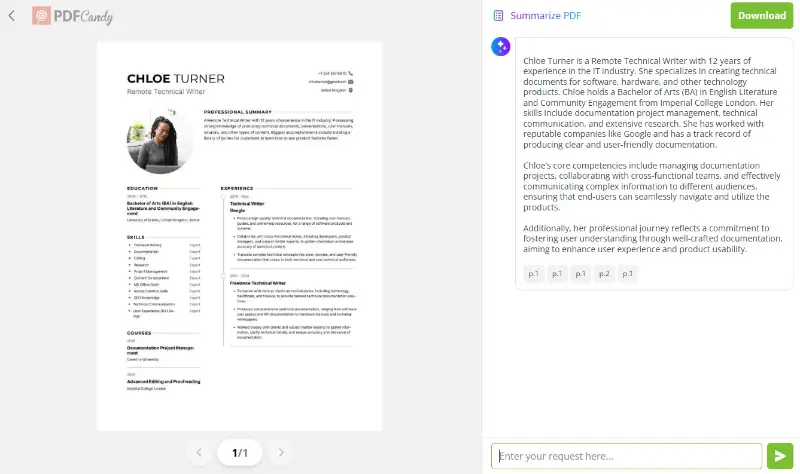
These are great for quick PDF summaries. Options like PDF Candy, ChatGPT, and Adobe’s built-in assistant excel at digesting long documents without losing structure. They can also find references inside the paper instantly.
Conversational AI
These models are better at interpretation, comparison, and editing text. If I need clearer wording or want to understand whether a trend is unusual, this is where I turn. They’re especially helpful when I want alternative explanations or simplified terminology.
Native crypto market research analytics tools
They don’t “read PDFs,” but they help me check claims from reports. I’ll cross-reference metrics using dashboards from platforms like Glassnode, Messari, TokenTerminal, or Nansen.
These aren’t chatbots, but they offer verification that AI sometimes glosses over.
Small utilities
A few helpers that ensure the flow is easier:
- Text extractors for cleaner exports.
- AI-enabled note-taking apps such as Notion or Mem.
- A simple citation generator for saving references.
This mix covers digestion, summarization, verification, and storage without making the process complicated.
My step-by-step workflow for smart crypto market research
Instead of describing a theoretical system, here is exactly what I do when a new PDF shows up in my inbox.
Step 1: Upload and get a structural summary
I usually begin by asking:
“Give me a high-level map of this report. Identify major sections and the topics inside each one.”
This creates a clear outline before I dive deeper.
Step 2: Generate a section-by-section recap
Once I know the structure, I request explanations for each segment. Sometimes I ask:
“Rewrite this part as if it were an internal briefing.”
This transforms dense academic writing into something readable.
Step 3: Extract numbers and metrics
Crypto reports love quantitative detail, so I ask the AI to:
- List major figures.
- Group them by topic.
- Call out anything unusual.
This helps me organize data for later fact-checking.
Step 4: Highlight author assumptions
Instead of accepting claims as-is, I request:
“What assumptions are the authors making about market behavior, users, or regulation?”
This exposes the underlying narrative.
Step 5: Ask for contradictions and gaps
A great prompt here is:
“Point out inconsistencies, unsupported statements, or unclear transitions.”
It helps me catch things I might skim past.
Step 6: Cross-check with independent analytics
Now I switch to dashboards. If a report claims a 40% increase in activity, I check Glassnode, Nansen, or TokenTerminal to see whether the data matches.
Step 7: Turn the summary into actionable notes
I keep a small outline that includes:
- Main observations
- Important signals
- A few quotes
- My own comments
- Risks or uncertainties
This creates a compact version of the PDF document I can revisit easily.
Turning PDF into something actionable
A summary alone doesn’t do much. The key is converting it into material you can actually use.
A one-page view
I gather the most relevant pieces and place them on one page:
- Short overview
- Most impactful metrics
- A few insights
- A tiny “if this, then that” section
This gives me a fast snapshot whenever I need it.
Comparison tables
When a report focuses on a specific sector, I create short tables like:
| Aspect | Network A | Network B |
|---|---|---|
| Fees | ... | ... |
| Growth | ... | ... |
| Activity | ... | ... |
| Integrations | ... | ... |
This helps me see broader trends at a glance.
Personal interpretation
I write a few paragraphs in my own voice explaining what the findings might mean.
Catching nuance and avoiding AI’s blind spots
AI is helpful, but it needs guardrails. Crypto research often mixes facts with speculation, so I treat the AI PDF summary carefully.
- Be cautious of invented details. If something sounds off, I verify it manually. Models sometimes infer things that weren’t in the text.
- Validate through external data. No matter how polished a PDF looks, I always cross-check important figures through analytics dashboards.
- Keep context in mind. Reports sometimes present only the most flattering angle. A human check helps maintain balance.
- Don’t rely too heavily on descriptions. AI PDF chat can describe charts, but its interpretations may miss nuance. I prefer examining visuals myself.
- Review methodology. Groups use different definitions, timelines, and sources. Smart tools sometimes condense methodology too much, so I skim it manually.
Organizing research for later
After trying many approaches, I found a structure that keeps everything accessible.
Tags
Each AI PDF summary receives a handful of simple tags that make searching painless later on. I usually include:
- Sector (L2s, DeFi, stablecoins, infrastructure, gaming, etc.)
- Network (Ethereum, Solana, Avalanche, Base, and so on)
- Time period (Q1 2025, H2 2024, or the specific month)
- Main theme (adoption trends, developer metrics, liquidity shifts, funding patterns)
- Noteworthy events or catalysts (protocol launches, upgrades, hacks, regulatory changes)
A running log
I keep a living document titled Quarterly Notes, which acts like a timeline of insights. Every time I process a new PDF, I paste its condensed version into this file along with:
- A date
- The source of the report
- A one-paragraph overview
- Three or four points that stood out
- Any contradictions with previous material
A simple archive
Older reports are stored in year-based folders. I rarely revisit the full documents, but I like knowing where they are.
Quick comparison sheets
Whenever a new quarterly report comes out — especially from big analytics providers — I update a set of small comparison sheets that capture changes across a few core metrics:
- Transaction volume and throughput
- Developer activity or tooling growth
- Funding, grants, and ecosystem investments
- Adoption signals such as active addresses, onboarding flows, or liquidity movement
These aren’t meant to be perfect dashboards. They’re more like a personal reference map that shows how different ecosystems are shifting across time. Since most of the heavy lifting is done when I summarize each PDF with AI, updating them usually takes only a few minutes.
What I appreciate about this step is that it makes trends visible without needing to reread anything. A quick look across quarters often reveals which sectors are genuinely expanding and which ones just had temporary hype.
Conclusion
AI won’t replace careful thinking, and it definitely won’t read the market for you. But as a research companion, it’s hard to beat.
These tools help me move through complex PDFs quickly, focus on the parts that matter, and form more grounded decisions without drowning in pages of jargon.
If your folder of “Important Crypto Reports” keeps growing untouched, experimenting with this workflow might be the start of a much lighter, more efficient routine.