

When I first dipped my toes into crypto, I felt like I’d accidentally wandered into a room where everyone was speaking a language I didn’t know.
Every article had words like “staking,” “gas fees,” and “slippage,” and I kept jumping between tabs trying to make sense of everything. Eventually, I realized that having one clean list would have saved me so much time.
So in this post, I’m putting together exactly that: a simple approach to building a beginner-friendly crypto glossary in PDF format. If you’re trying to help another person get started, or you just want your own reference guide, this structure will ensure the entire process is easier.
What makes a crypto glossary actually useful?
I've seen many glossaries over the years, and most of them struggle with the same issues. They're either overloaded with advanced crypto terminology or too vague to be helpful. To create something that genuinely works for beginners, keep a few principles in mind:
- Short, readable explanations. If the definition needs another definition, it defeats the purpose. The first-time reader should understand everything without feeling lost.
- A simple example for each term. A real situation is easier to digest than abstract talk. For instance, instead of explaining a “gas fee” with technical theory, show it through a common action like moving tokens from one wallet to another.
- Separation between topics. Throwing 200 words into one long block is overwhelming. Grouping by theme makes the learning process more natural.
- Consistent styling. Fonts, spacing, and headers should match. A tidy document is far more inviting than a wall of text.
When someone opens your PDF, they should feel like they’re stepping into a clear introduction, not a university lecture.
How to structure your crypto glossary?
There’s no single correct way to organize a document, but some formats make reading much smoother. Here are a few ways to arrange the material, depending on how you want the result to feel:
1) Categories first, alphabet second
Start with sections instead of letters. This works extremely well for beginners because they can focus on one theme at a time.
For example:
- Wallets & Keys
- Blockchain Basics
- Trading and Market Vocabulary
- Security & Safety
- DeFi and Protocols
- Networks & Tokens
Inside each section, you can alphabetize for easier scanning. It’s the best of both worlds.
2) Pure alphabetical order
This works if your crypto dictionary is shorter and your audience already has some basic context. It gives everything a predictable flow, but it can feel chaotic for brand-new readers because wallet terms might appear right next to something entirely unrelated.
3) Hybrid layout
You create a small “core list” at the beginning — maybe 10–15 essential words — and then group the rest by topic. This format resembles a quick-start guide.
Key crypto terms worth including
Every crypto glossary will look a little different, but here are categories and sample terms that consistently help beginners. Try to give each one one or two sentences and a real example.
Wallets & Keys
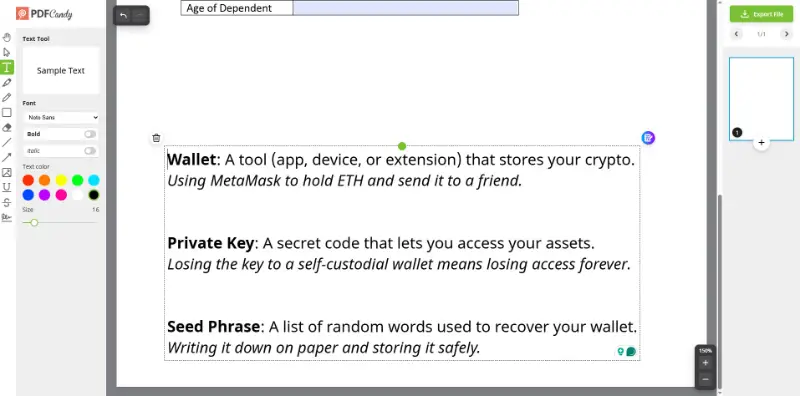
Wallet: A tool (app, device, or extension) that stores your crypto.
Using MetaMask to hold ETH and send it to a friend.Private Key: A secret code that lets you access your assets.
Losing the key to a self-custodial wallet means losing access forever.Seed Phrase: A list of random words used to recover your wallet.
Writing it down on paper and storing it safely.
Blockchain Fundamentals
The base layer of crypto language always starts with the mechanics behind blockchains. Concepts like blocks, transactions, networks, and protocols appear everywhere.
Someone who understands these ideas early on will absorb more advanced material with much less friction.
A few essentials to define in your PDF:
block, node, consensus mechanism, layer 1, layer 2, smart contract.
Market Language
- Bull Market – A period where prices generally rise.
- Bear Market – The opposite, with persistent drops.
- Liquidity – How easily an asset can be bought or sold.
- Market Cap – Total value of a cryptocurrency.
- Volume – How much of an asset trades within a time frame.
These phrases pop up everywhere, even outside crypto-specific jargon conversations.
Security & Safety
If there’s any section you shouldn’t skip, it’s this one. People often jump into the industry with enthusiasm and forget that digital assets require careful handling.
Words like “phishing,” “cold storage,” “multisig,” and “whitelisting” might sound intimidating at first, but a short explanation goes a long way toward helping someone avoid mistakes.
In your crypto glossary, keep these definitions straightforward and add a small note describing how a user might encounter each situation.
DeFi Basics
- Governance token
- Liquidity pool
- APR / APY
- Bridging
- Stablecoin
Beginners don’t need to become experts, but recognizing these crypto terms helps them understand what they see on dashboards and exchanges.
Networks & Assets
Explain major networks like Bitcoin, Ethereum, Solana, and Polygon, along with the idea of native tokens. This section doesn’t have to be deep — just enough to help readers understand why each differs and how they fit into the bigger ecosystem.
Turning your glossary into a PDF
Creating the list is one step; packaging it neatly is another. Thankfully, PDF creation doesn’t require special software or anything expensive. Most tools people already use can export to this format.
Simple options
- PDF Candy: Online versatile platform for various PDF tasks.
- Google Docs: Clean, fast, and easy to update.
- Notion: Great for visually structured layouts; exports surprisingly well.
- Canva: Ideal if you want a visually appealing cover or stylized headers.
- Apple Pages / Microsoft Word: Reliable and flexible.
Try not to over-design the document. It’s meant to be a reference, not a brochure. Choose a single readable font for body text, add clear headings, and leave enough white space so eyes don’t get tired.
Glossary formatting tips
- Use headers consistently across all sections.
- Include page numbers if the result ends up long.
- Keep definitions short enough to fit without unnecessary breaks.
- Add bookmarks or a clickable table of contents if your editor allows it.
- A quiet layout works best. Let clarity do the heavy lifting.
Making the crypto glossary easy to share
Once your PDF is ready, it becomes even more useful when you distribute it in the right ways. A great document shouldn’t sit quietly in a folder — let it help people.
Here’s how you can make this process effortless.
Add a simple cover page
It doesn’t need to be fancy. Your name, the title, maybe a subtitle like “A beginner-friendly crypto reference.” That alone gives it a polished feel.
Use clickable elements
If your PDF tool supports internal links, place them. Quick navigation from the contents page is incredibly convenient, especially on mobile.
Host it somewhere accessible
A few good options:
- Shareable link
- Google Drive
- Dropbox
- Your website or blog
- A link in a community channel
Try to provide a direct download link whenever possible so people don’t need extra steps.
Update it occasionally
Crypto jargon changes often. Terms evolve, new concepts appear, and old ideas fade away. Updating your paper once in a while keeps it relevant. A version number or date on the cover page helps readers know they’re using the latest edition.
Conclusion
A well-made crypto dictionary seems like a small thing, but it can genuinely change the way new investors experience the world. Instead of bouncing between definitions and forum threads, they get one solid resource they can return to whenever something feels unclear.
If you decide to create one, think of it as a friendly map for someone stepping into unfamiliar ground. It doesn’t need to be perfect — just clear, welcoming, and easy to follow. And the best part? Once you build the structure, updating it becomes effortless as new crypto terms appear.