
There are numerous scenarios where knowing how to reduce a PDF file size on your Mac is absolutely necessary.
High-capacity storage on Apple devices isn’t exactly budget-friendly, so clearing space by compressing bulky docs makes a lot of sense. And don’t forget most email services) have a strict attachment limit (usually around 25 MB), so large PDFs are pretty much a no-go for direct sharing.
But here’s the thing: you can’t compromise on quality. The tool needs to deliver results without turning your text into blurry gibberish. Also, it needs to play nice with macOS—compatibility is non-negotiable.
This guide covers 6 reliable methods for compressing a PDF on a Mac, making sure you maintain the original fidelity and function throughout the process.
PDF Candy (online)
PDFs remain one of the most widely used extension. They are easy to share, maintain consistent layout across devices, and can include various elements such as text, images, videos, and more.
Despite this flexibility, some archives can become quite large. That’s why having a dependable platform like PDF Candy is valuable.
How to change a PDF weight
- Open the online PDF compressor in Safari or any browser on your Mac.=
- Upload items by clicking "+ Add file(s)" or dragging them into the window. You can process multiple items simultaneously.
- Pick the preferred level:
- Maximum reduces PDF size as much as possible.
- Recommended is set to make PDF smaller while preserving the quality.
- Once your settings are picked, hit "Compress". Note that PDFs already condensed may not shrink further.
- To save the output, tap "Download" in the following window.
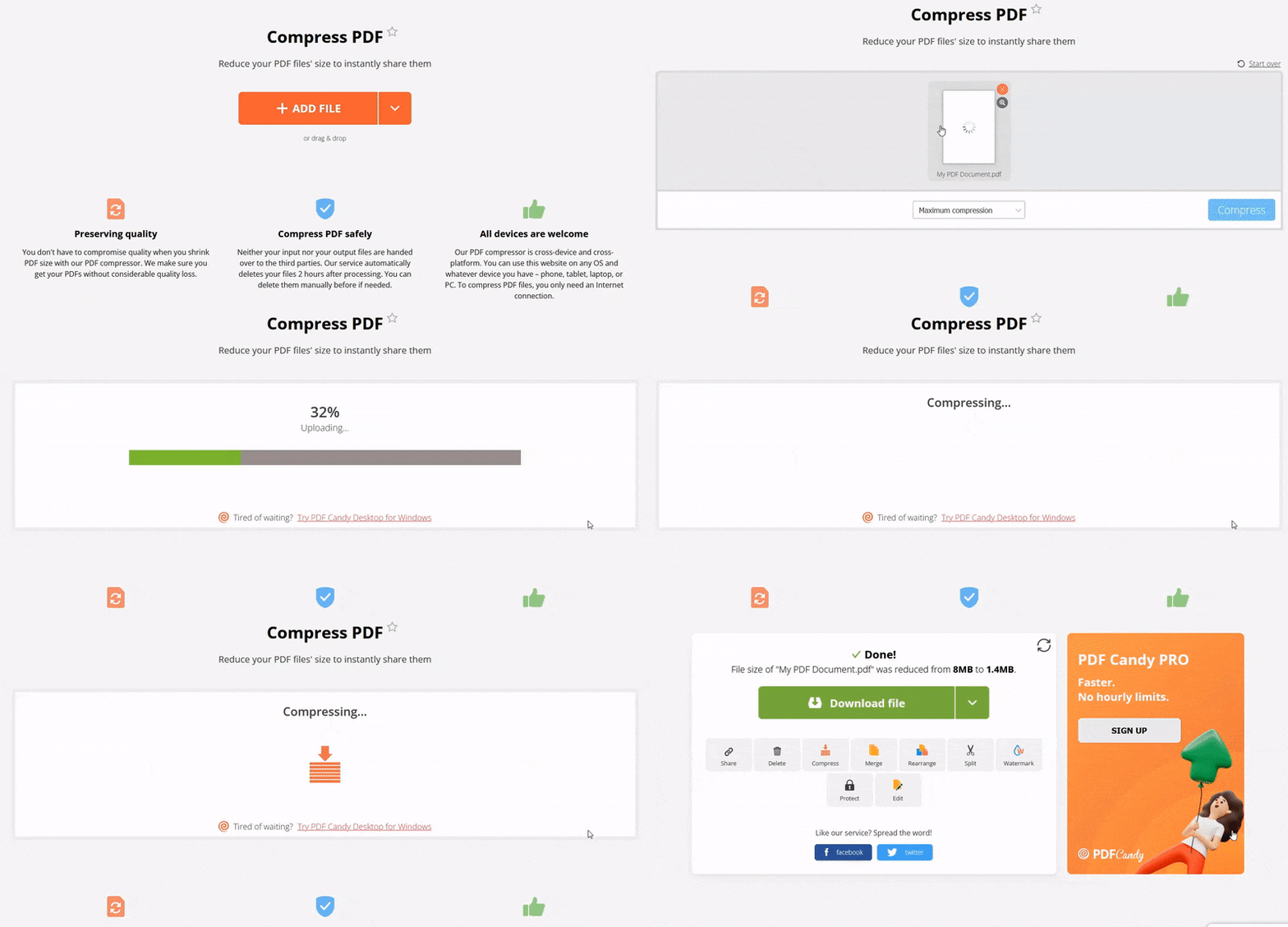
On the resulting page, additional options are available. For instance, you can add password protection before sharing the package.
In general, this online PDF file size reducer offers 90 extra tools to streamline working with PDFs and enhance efficiency.
Now that you understand how to make a PDF smaller on Macintosh, explore other features available in PDF Candy.
Compatible with all Apple devices
For users within the Apple ecosystem, this free service allows seamless dimensions on MacBook models—Air or Pro—iMac, iPhone (Pro, Pro Max, Mini, SE), and iPad. Multiple iOS versions are fully supported, ensuring smooth operation.
Save, share, or upload the compressed PDF
Once a draft is optimized online, you can choose how to handle it. Options include downloading it directly to your PC, placing to Google Drive or Dropbox, or generating a URL. The link comes with a QR code, enabling easy transfer to mobile phones.
High-level security
PDF Candy guarantees safe processing. Compressed papers are automatically erased from servers after two hours, and you also have the option to remove them manually whenever needed.
Ideal for
- Brand Strategists – Deliver compact campaign decks for smooth client handoff.
- Operations Managers – Streamline oversized progress logs into lighter records.
- Academic Reviewers – Optimize manuscripts with figures for smoother journal uploads.
PDFCOMPRESSOR.COM (online)
Lighter PDFs are more likely to be compatible with older devices and less powerful software. This ensures they can be opened across different computers and smartphones, regardless of system specifications.
To reduce the PDF size on Mac, you can use a specialized online service with a straightforward domain—pdfcompressor.com.
Below is the instruction for this website:
- Open the website to find the PDF reduction tool.
- Click "Upload files" or drag and drop your document into the designated frame.
- Once the process finishes, the page will display the percentage achieved.
- Hit the "Download" button to save the optimized material. If multiple PDFs were processed, select "Download all" to retrieve them together.
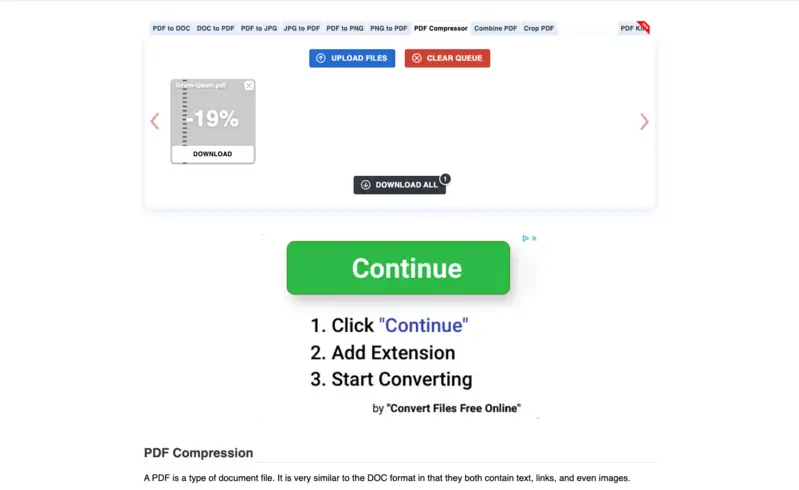
Although the service focuses primarily on how to make PDF files smaller, it also provides links to other tools by the same developers. For instance, you can convert JPG to PDF directly by selecting the corresponding option above the workspace.
Ideal for
- Independent Authors – Submit leaner manuscripts for digital publishing.
- Courtroom Registrars – Minimize evidence bundles for electronic filing.
- Visual Artists – Condense image-heavy portfolios for faster sharing.
Soda PDF (online)
Reducing PDF size renders portfolios simpler to share securely over networks or online, preventing slow downloads or issues for recipients with limited internet speed.
Soda PDF provides an effective solution for downscaling PDFs on Mac. Its extensive set of features makes it a versatile choice for managing digital documents efficiently.
How to use Soda PDF to reduce a PDF file size online:
- Open the "Compress PDF" section on the platform.
- Upload your paper by clicking "Choose file" or dragging it into the tool interface.
- Pick either "Regular Compression" or "High Compression". Note that the high option is available only with a Pro subscription.
- Press "Compress files" and wait while the system processes the item.
- In the next window, hit "Download" to save the output.
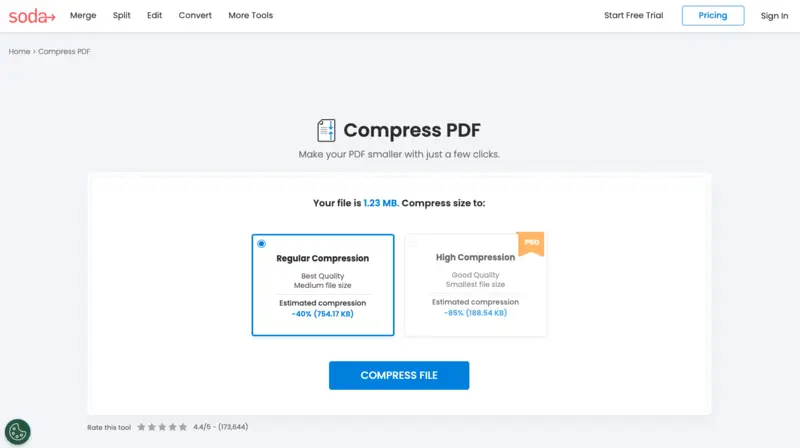
The download page also gives access to other features. For example, you can edit PDFs online or divide a single document into multiple smaller files.
Ideal for
- Press Officers – Circulate press kits containing multimedia with ease.
- City Planners – Share condensed zoning diagrams without sacrificing clarity.
- Funding Coordinators – Upload applications with supporting attachments under strict size rules.
Preview
At times, you may be working on a laptop or desktop without an internet connection. In such cases, having a local program to reduce PDF size is very convenient.
Another effective way to compress PDFs is to use the built-in application—Preview.
How to employ this free PDF compressor:
- Open the PDF you want to shrink with Preview.
- Click the "File" menu and choose "Export".
- From the "Quartz Filter" dropdown, select "Reduce File Size". Ensure the document is saved as PDF in the "Format" field.
- Enter a new name in "Export As" and pick a folder for the result. Tap "Save" to complete the PDF compression.
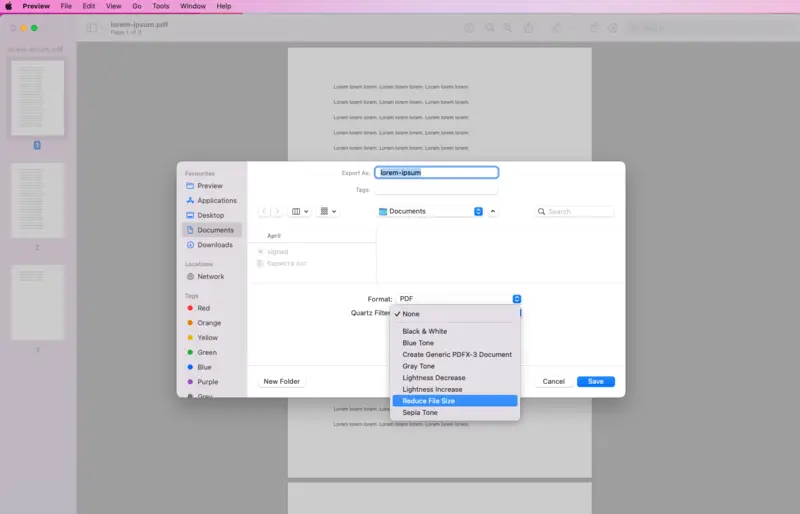
Over time, this service has evolved from a basic viewer to a full-featured PDF editor for Mac.
Within Preview, you can also white out sections of a PDF you no longer need. Exploring these instruments makes the app* a versatile tool not only for reducing PDFs but also for broader document editing tasks.
Ideal for
- Digital Archivists – Store historical records while conserving disk space.
- Educators – Provide optimized lecture packets for student distribution.
- Policy Analysts – Prepare classified materials without reliance on cloud servers.
PDFsam Visual
Compressing PDF files size helps reclaim storage space on both local drives and cloud accounts. This is particularly helpful when managing multiple materials or sharing them via URL.
For regular PDF compression, consider employing a designated software, like PDFsam Visual.
How to make a PDF smaller on Mac:
- Download and install the application on your device.
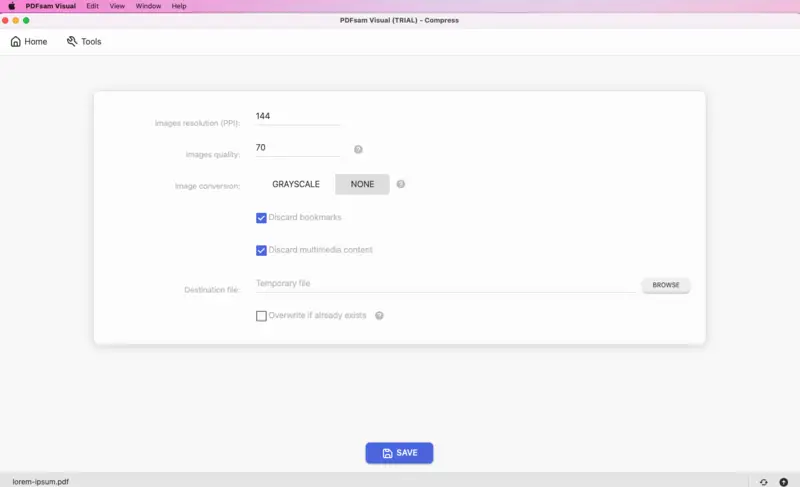
- Open the utility and access the "Compress" feature.
- Drag the PDF you want to optimize into the main workspace.
- Configure resolution, conversion, and other settings, then press "Save" to begin PDF reduction.
- Once the process is complete, preview the PDF or locate it in the selected folder.
Then you can perform extra actions. Under "Continue with", options include merging PDFs via "Organize", "Extract text", or "Split by pages" for the new record.
Overall, PDFsam Visual offers good functionality as a PDF size reducer for Mac together with other handful instruments for manipulating files.
Ideal for
- Medical Administrators – Consolidate extensive case records into manageable archives.
- Design Engineers – Reduce highly detailed technical drawings while maintaining readability.
- Investigative Reporters – Manage and compress large sets of supporting documents.
Lightweight PDF
Compressing PDFs makes it easier to print them quickly without delays or errors.
Lightweight PDF stands out as one of the simplest tools for shrinking PDFs on Mac. While it focuses solely on reducing PDF file size on Mac, it does not offer another options found in other platforms.
What you need to do to use this free PDF compressor for Mac:
- Download and install the program.
- Click the arrow-down button or move the PDF into the application window.
- The software will display the amount of compression achieved and the final size.
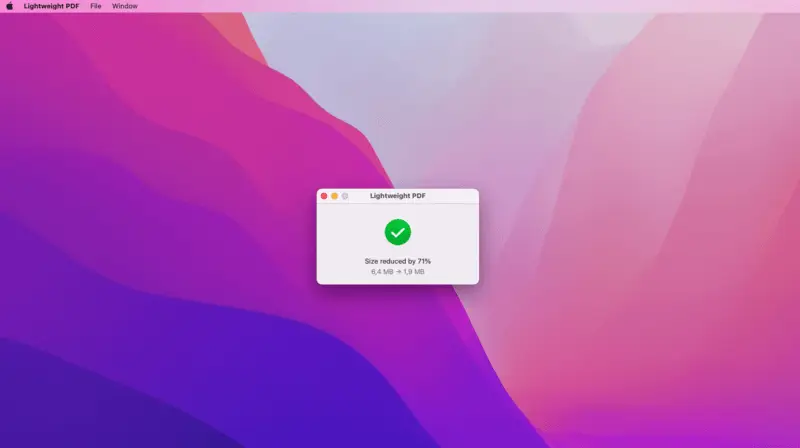
Keep in mind that the application replaces the original files after compression. If you want to retain the unmodified version, create a backup.
Ideal for
- Sales Agents – Share smaller catalogs with prospective clients.
- Paralegal Staff – Distribute lean contracts internally.
- Illustrators – Submit compact creative portfolios for gallery reviews.
Tips on compressing files
- Subset embedded fonts: Include only the characters actually employed to cut unnecessary overhead.
- Remove metadata: Eliminate annotations, hidden layers, bookmarks, and extra information.
- Simplify vector graphics: Reduce paths, anchor points, and complex shapes.
- Discard unnecessary elements: Delete invisible objects, redundant components, or superfluous pages.
- Change color profiles: Switch images to RGB for digital application or CMYK for printing to trim data load.
- Minimize transparency: Simplify or flatten effects that increase complexity.
- Eliminate unused attachments: Remove embedded piles or references that aren’t needed.
- Optimize form fields: Reduce size and number of interactive form elements if possible.
FAQ
Will compressing a PDF affect its quality?
The outcome depends on the settings applied. Certain techniques lower image resolution to reduce PDF file size, whereas others retain original clarity as much as possible.
Can PDFs be resized on a mobile device?
Yes, there are applications for both iOS and Android that allow PDF optimization directly on smartphones or tablets. Alternatively, you can access an online PDF compressor through a browser, functioning similarly to desktop utility.
What additional ways exist to reduce PDF size?
It can be minimized by removing unnecessary elements or lowing image quality. Stripping embedded fonts, metadata, and other redundant components also contributes to smaller documents.
How do vector graphics impact PDF volume?
Vector illustrations are scalable and usually contain less data than raster images. Simplifying the number of paths, points, or objects within vectors can further decrease file size.
Conclusion
Knowing how to compress a PDF on a Macbook or iMac is a must-have skill. Especially it's important when you send and receive files in this format regularly.
Explore the described offline or online PDF compressors for creating documents that are simpler to access and easier to work with!