
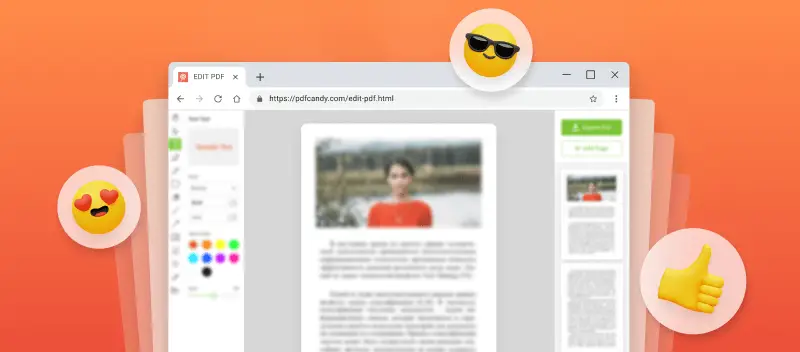

The key advantage of PDFs is their ability to maintain formatting, ensuring a uniform look on any device. PDF Candy, a virtual tool for managing digital documents, offers a top-rated online PDF editor to meet your needs.
This article covers how to customize a PDF and highlights the main features of the platform. You will also read about the advantages of modifying PDFs over the Internet rather than in a desktop program.
How to edit a PDF online with PDF Candy
To use PDF Candy, you only need a web browser. The service can be opened through all modern surfers - Firefox, Chrome, Safari, Edge, etc.
- Open the best free online PDF editor on your computer, table, phone.
- Upload the document with the "Add File" button or drag and drop it directly into the window.
- Now, you can refine the text by selecting the words or sentences that need adjustment. You are also able to whiteout blocks, add signature, insert illustrations, and perform other modifications. Read in detail about each available tool below.
- Save the resulting file with "Export".
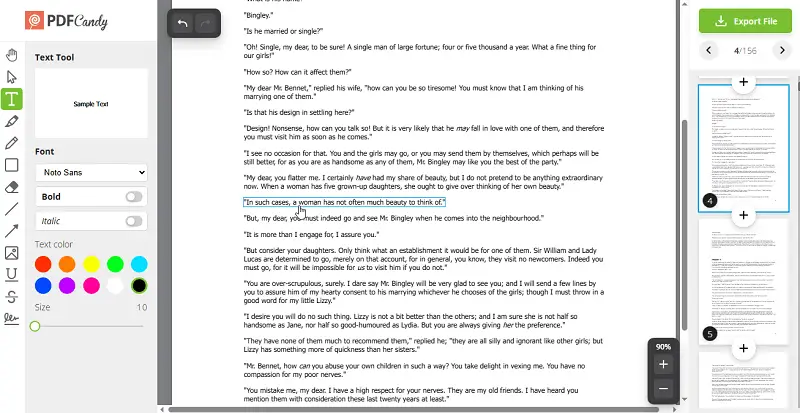
Tools of this online PDF editor
| Instrument | Description |
|---|---|
| Hand | Enables seamless navigation across the paper, making it ideal for detailed viewing on a larger scale. |
| Text | Allows to create and change text in PDFs. It supports font recognition, ensuring compatibility. Additionally, it is useful for adjusting tables, captions, and other elements. Customization options include color, size, bold, and italics. |
| Highlight Text | Emphasizes key points or paragraphs within a draft. It is effective for marking significant words or sentences, with color and transparency up to your choice. |
| Pencil | Permits freehand drawing and annotation. Individuals can alter line color and thickness. |
| Rectangle | PDF modifier helps frame specific content for emphasis. Options contain outline solidity, tone, fill shade, and transparency. |
| Whiteout | Removes unwanted text or sections. Frequently utilized for eliminating irrelevant or sensitive details. |
| Line | Adds straight lines to enhance structure. Density and hue can be customized. |
| Arrow | Directs attention to specific elements, such as snapshots or tables. You can set the tone. |
| Add Image | Inserts graphical elements, such as company logos. Users can resize or embed illustrations via a link. |
| Underline | Places a line beneath selected text to highlight key information. |
| Strikeout | Draws a line through characters to indicate removal or revision. |
| Signature | PDF text editor enables digital signing with options to draw, type, or upload an image. |
Besides learning how to easily edit a PDF, this platform has a functional toolkit for other manipulations with electronic papers. You can make a customized PDF document, update existing information, and incorporate new content.
Apart from being able to modify a PDF online, the website will help you perform additional adjustments, like rearranging pages, putting a watermark, refining metadata, and others. Moreover, the service has numerous conversion options from and to PDF.
Pros of this free online PDF editor
Having a utility that works in a browser has its advantages:
- Operates on any device regardless of the OS and model - Androids and iPhones (Pro, ProMax, Plus, Mini, SE), Windows (7, 10, and other) and Mac (iMac, MacBook Air, MacBook Pro);
- Allows to edit your PDF for free without the need to install any software;
- Is compatible with any browser - Google Chrome, Firefox, Safari, Edge, and more;
- Supports uploading documents from cloud storage services - Google Drive and Dropbox;
- Stores your resulting PDFs for 2 hours and then automatically deletes;
- Apart from an instrument to change the text in PDF, offers 90 additional instruments;
- Has a user-friendly interface;
- No watermark is added to your files.
Honestly, I think this web-based PDF editing tool is super handy for all sorts of people. If you’re a student, you can mark up your lecture notes or tweak assignments without stressing about downloading some heavy software. Teachers would probably love it too for adding quick notes or comments to papers.
For me, I see it being really useful for anyone working on the go—like freelancers—since you can fix up a contract, drop in a logo, or sign something right from your phone. Even admin staff or small business owners would save a ton of time filling forms or receipts without needing fancy utensils.
Tips on editing PDF documents
Here are some hints on how to polish your drafts before and after using the best PDF editor:
- Optimize your PDF. Compress your file before modifying PDF to reduce the size and fasten the processing.
- Organize your content. Reorder the pages, add bookmarks, and utilize searchable text to make information easier to find.
- Split PDFs. Divide large piles into smaller segments or extract pages for retouching.
- Convert formats. Employ online PDF editors to quickly turn an item into various formats such as Word, XLS, PPT, PNG, HTML, and more.
- Merge. Combine multiple files into one and rearrange them in any order you want.
- Add multimedia elements. Enhance your PDFs with audio, video, images, and interactive forms.
- Annotate text. Insert notes, highlights, comments, and other marks to your PDFs with the help of annotation tools like sticky notes, arrows, or lines.
- Secure archives. Protect your content by setting passwords and permissions so only authorized users can access them.
FAQ
What is the difference between altering vector graphics and raster images?
Vectors maintain resolution independence but require re-encoding curves or shading. Raster edits often involve recompression, potentially degrading visual quality.
Can large files be optimized during modification?
Yes. It may include reducing object streams, removing unused elements, and subsetting fonts. These steps improve performance while retaining fidelity.
Which standards govern reliable PDF manipulation?
Relevant specifications cover ISO 32000 (core PDF), PDF/A for archival purpose, PDF/X for print workflows, and PDF/UA for accessibility.
The best free online PDF editor: conclusion
This utility to edit PDF online has many benefits, from its variety of tools to the lack of dependency on the device's performance.
When choosing a program, consider the simplicity, and the range of options available. Additionally, be mindful of security. Finally, read all terms and conditions carefully before committing to any service.
This platform will reduce the time you spend refining digital documents and open new conversion and modification options opportunities. Start working with PDF Candy now and explore all the platform's instruments to refine PDFs online and for free.

.webp?w=420&h=184)
